Why My Microservices Broke on OpenShift — And How a Hidden Kubernetes Quota Nearly Cost Me Days
Why My Microservices Broke on OpenShift — And How a Hidden Kubernetes Quota Nearly Cost Me Days
If you're deploying microservices on OpenShift's free Developer Sandbox (or any resource-constrained Kubernetes cluster), this post might save you hours of debugging.
The Setup
I built a production-grade mobile application backed by a microservices architecture — four Spring Boot services deployed to Red Hat OpenShift Developer Sandbox via a fully automated GitHub Actions CI/CD pipeline.
The stack:
- Flutter mobile frontend (automated APK releases)
- API Gateway (Spring Cloud Gateway) — single entry point for all client requests
- Auth Service — handles registration, login, OTP verification, JWT tokens
- User Service — user profiles, preferences, settings
- Core Service — main business logic, AI features, data processing
- MongoDB Atlas — separate databases per service
- GitHub Container Registry (GHCR) — Docker image hosting
- OpenShift Developer Sandbox — free-tier Kubernetes hosting
Everything was containerized, secrets-managed, health-probed, and CI/CD automated. It worked flawlessly on localhost. Then I deployed it.
It broke. For two days.
The Architecture
Here is how the system is wired:
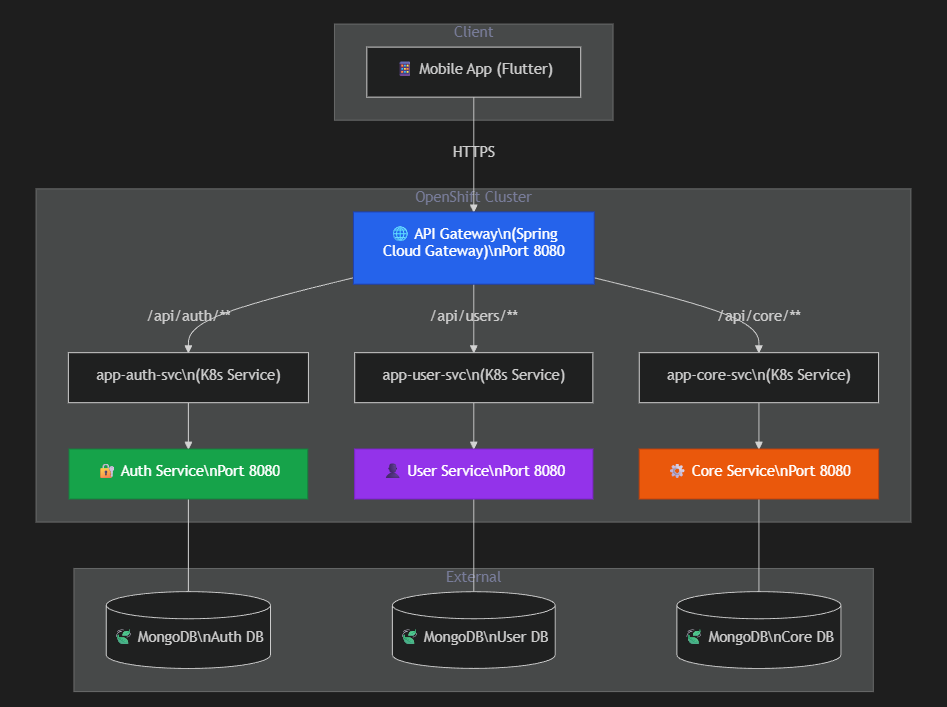
The mobile app hits the API Gateway via an OpenShift Route (HTTPS). The gateway reads the URL path and forwards it to the correct internal microservice via Kubernetes Service DNS names (e.g., http://app-auth-svc:8080).
The CI/CD Pipeline

Every push to main triggers a GitHub Actions workflow that:
- Builds all 4 services with Maven
- Creates Docker images and pushes to GHCR
- Logs into OpenShift via CLI (
oc login) - Creates/updates Kubernetes secrets (MongoDB URIs, JWT secret, API keys)
- Applies all deployment manifests
- Runs
oc rollout restarton each deployment - Waits for health checks to pass
Sounds bulletproof, right? Here is where it fell apart.
The Symptom
After deploying, the app showed one message on every action — registration, login, anything:
"Something went wrong. Please try again later."
The classic generic error that tells you absolutely nothing.
Bug #1: The Silent Quota Killer
What I Saw
The CI/CD pipeline failed with this in the logs:
AuthServiceApplication - Started AuthServiceApplication in 36.106 seconds
...
Error from server (BadRequest): previous terminated container "app-auth"
in pod "app-auth-xxxxx-xxxxx" not found
Error: Process completed with exit code 1.
Confusing, right? The auth service clearly started successfully (36 seconds, listening on port 8080). But the deployment was marked as failed.
Digging Deeper
Looking at the pod events, I found:
Readiness probe failed: Get "http://10.x.x.x:8080/actuator/health":
  connection refused
And buried further down, the real error:
replicasets.apps is forbidden: exceeded quota
What Actually Happened
Here is what most people do not know about Kubernetes deployments:
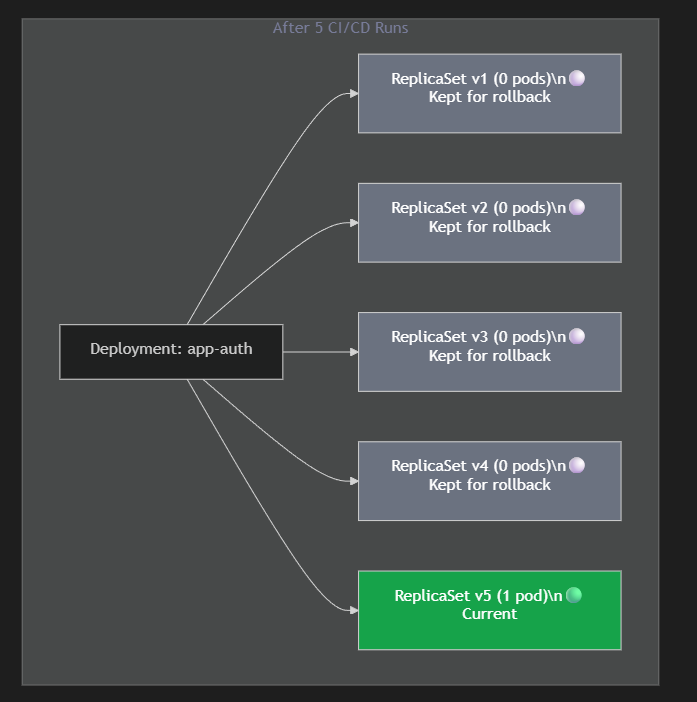
Every time you run oc rollout restart (or kubectl rollout restart), Kubernetes does not just restart your pods. It creates an entirely new ReplicaSet while keeping the old ones around as rollback history.
By default, Kubernetes keeps the last 10 ReplicaSets per deployment (controlled by revisionHistoryLimit, which defaults to 10).
Now multiply that by 4 microservices:
- 4 services × 10 ReplicaSets = 40 ReplicaSets
The OpenShift Developer Sandbox (free tier) has a strict quota on the total number of ReplicaSets allowed in your namespace. After just a few CI/CD runs, I silently hit that ceiling.
When the quota is exceeded:
- Kubernetes cannot create new ReplicaSets for the rollout
- No new ReplicaSet = no new pods get scheduled
- No pods = readiness probe has nothing to connect to →
connection refused - Rollout waits... and eventually times out →
context deadline exceeded - Pipeline fails with
exit code 1
The app code was perfectly fine. Kubernetes just silently refused to create pods.
The Fix
There are two approaches, and I recommend using both:
Fix A: Set revisionHistoryLimit in Your Deployments (Best Practice)
Add revisionHistoryLimit: 1 to every deployment manifest:
apiVersion: apps/v1
kind: Deployment
metadata:
  name: my-service
spec:
  revisionHistoryLimit: 1    # Only keep 1 old ReplicaSet
  replicas: 1
  selector:
    matchLabels:
      app: my-service
  # ... rest of your spec
Why
1and not0? Setting it to0means Kubernetes keeps zero rollback history. If a bad deployment goes out, you cannot dooc rollout undoto instantly revert. Keeping1gives you exactly one rollback point — enough for safety without wasting quota. This is the best practice because if anything goes wrong with a new deployment, you still have an instant rollback option.
With 4 services at revisionHistoryLimit: 1:
- 4 services × (1 current + 1 old) = 8 ReplicaSets — well within any quota.
Fix B: Add Cleanup to Your Deploy Script (Recovery Safety Net)
Add this before the rollout restart commands in your deployment script:
# Clean up old ReplicaSets to avoid quota issues on free-tier clusters
echo "Cleaning up old ReplicaSets..."
for dep in app-auth app-user app-core app-gateway; do
  # Get all ReplicaSets for this deployment, sorted oldest first
  # Delete all except the most recent one
  OLD_RS=$(oc get rs -l "app=$dep" \
    --sort-by=.metadata.creationTimestamp \
    -o name 2>/dev/null | head -n -1)
  if [ -n "$OLD_RS" ]; then
    echo "$OLD_RS" | xargs oc delete
    echo "  Cleaned old ReplicaSets for $dep"
  fi
done
Fix B is useful for one-time recovery when you have already hit the quota, or as a safety net alongside Fix A. But Fix A is the real solution — it is declarative, permanent, and prevents the problem from ever occurring again.
Bug #2: The Gateway That Routed to Itself
Even after fixing the quota issue and getting all pods running, the app still did not work. Registration still failed.
The Clue
I hit the gateway health endpoint directly:
curl https://my-gateway-route.apps.openshiftapps.com/actuator/health
# → 200 OK ✅
Gateway was healthy. But hitting an actual API route:
curl https://my-gateway-route.apps.openshiftapps.com/api/auth/signup
# → 502 Bad Gateway ❌
The Problem
My API Gateway's application.yml had hardcoded localhost URLs for routing:
spring:
  cloud:
    gateway:
      routes:
        - id: auth-service
          uri: http://localhost:7071        # Works on my laptop
          predicates:
            - Path=/api/auth/**

        - id: user-service
          uri: http://localhost:7072        # Works on my laptop
          predicates:
            - Path=/api/users/**

        - id: core-service
          uri: http://localhost:7073        # Works on my laptop
          predicates:
            - Path=/api/core/**
On my machine, all 4 services run on the same host (localhost) on different ports. It works.
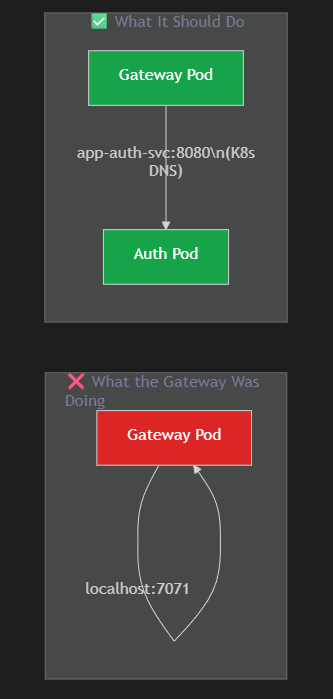
On Kubernetes, each service runs in a separate pod with its own network namespace. localhost:7071 inside the gateway pod is just... the gateway pod itself. There is nothing listening on port 7071 there.
The Irony
My deploy script already created the correct internal URLs as Kubernetes secrets:
oc create secret generic app-secrets \
  --from-literal=AUTH_SERVICE_URL="http://app-auth-svc:8080" \
  --from-literal=USER_SERVICE_URL="http://app-user-svc:8080" \
  --from-literal=CORE_SERVICE_URL="http://app-core-svc:8080"
And my other services correctly used them:
# core-service application.yml — Correct
app:
  user-service:
    base-url: ${USER_SERVICE_URL:http://localhost:7072}
Only the gateway was missed. The env vars were injected into the pod but never referenced in the routing config.
The Fix
Replace hardcoded URLs with environment variable references (with localhost as the default for local development):
spring:
  cloud:
    gateway:
      routes:
        - id: auth-service
          uri: ${AUTH_SERVICE_URL:http://localhost:7071}
          predicates:
            - Path=/api/auth/**

        - id: user-service
          uri: ${USER_SERVICE_URL:http://localhost:7072}
          predicates:
            - Path=/api/users/**

        - id: core-service
          uri: ${CORE_SERVICE_URL:http://localhost:7073}
          predicates:
            - Path=/api/core/**
The ${ENV_VAR:default} syntax means:
- On Kubernetes: uses the injected secret value →
http://app-auth-svc:8080 - On localhost: falls back to the default →
http://localhost:7071
One config, works everywhere.
The Complete Debugging Checklist
If your microservices work locally but fail on OpenShift/Kubernetes, run through this:
| # | Check | Command |
|---|---|---|
| 1 | Are pods actually running? | oc get pods |
| 2 | Are readiness probes passing? | oc describe pod <pod-name> |
| 3 | Can the pod start at all? | oc logs <pod-name> |
| 4 | Is there a quota issue? | oc describe quota |
| 5 | How many ReplicaSets exist? | oc get rs |
| 6 | Is the gateway routing correctly? | curl <gateway-url>/actuator/health |
| 7 | Are env vars injected properly? | `oc exec <pod> -- env |
| 8 | Is the service DNS resolving? | oc exec <gateway-pod> -- curl http://app-auth-svc:8080/actuator/health |
Lessons Learned
1. "It works on my machine" extends to Kubernetes
localhost routing is the microservice equivalent of "works on my machine." Always use environment variables with sensible defaults so the same config works in both environments.
2. Kubernetes fails silently in ways you do not expect
The ReplicaSet quota error did not crash my app. It did not log a warning. It just silently prevented new pods from being created, and the symptoms (readiness probe failure, connection refused) pointed you in the completely wrong direction.
3. Free-tier clusters have hidden constraints
OpenShift Developer Sandbox, Google Cloud free tier, Azure free tier — they all have resource quotas that do not exist in your local Minikube or Docker Desktop Kubernetes. Always run oc describe quota (or kubectl describe quota) in your namespace to know your limits.
4. Set revisionHistoryLimit from day one
Do not wait until you hit the quota. Add revisionHistoryLimit: 1 to every deployment manifest as a standard practice. It keeps your cluster clean, stays within quotas, and still gives you one rollback point for safety.
5. CI/CD amplifies configuration bugs
When you deploy manually, you might catch issues because you are watching the logs. When CI/CD deploys automatically on every push, a configuration bug silently breaks production while you are still writing code, thinking everything is fine.
Summary
| Bug | Root Cause | Fix |
|---|---|---|
| Pods not starting | ReplicaSet quota exceeded from accumulated rollout history | Set revisionHistoryLimit: 1 in deployment manifests |
| Gateway 502 | Route URIs hardcoded to localhost | Use ${ENV_VAR:localhost} pattern in gateway config |
If you are deploying microservices on a free-tier Kubernetes cluster and your deployments mysteriously stop working after a few CI/CD runs — check your ReplicaSet count. That silent quota limit is probably the culprit.
Have you hit weird Kubernetes issues on free-tier clusters? I would love to hear about them — connect with me on LinkedIn or check out more on anupamkushwaha.me.